< Назад | Содержимое | Далее >
ATEQ TPMS RESET PROCEDURE
GM - Procedure 28
ATEQ TPMS RESET PROCEDURE
NOTE: Unless otherwise stated, on most tire pressure sensor equipped vehicles, low tire pressure indicator lights and messages can be cleared by inflating tires to the specified pressure and driving at least 25 mph or more for a few minutes. A sensor activation tool (TPMS3) can be used in place of driving.
1. Set the tire pressure of all wheels to pressure specified on the tire and loading information label.
2. Set the parking brake.
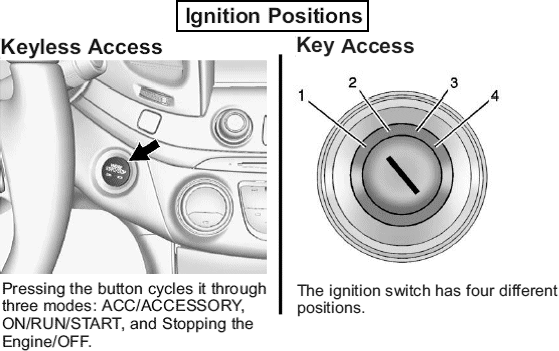
3. Turn the ignition to ON/ RUN with the engine OFF or place the vehicle power mode in ON/ RUN/ START. See Fig. 1.
4. Make sure the Tire Pressure info page option is turned on. The info pages on the Driver Information Center (DIC) can be turned on and off through the Settings menu.
5. Use the DIC controls on the right side of the steering wheel to scroll to the Tire Pressure screen under the DIC info page.
6. Press and hold the SET/RESET (check mark symbol) button located in the center of the DIC controls.
7. The horn sounds twice to signal the receiver is in relearn mode and the TIRE LEARNING ACTIVE message displays on the DIC screen.
8. Starting with left front tire, hold the TPMS3 against the side wall of the tire, within 3 inches of the valve stem. Press TEST button on the TPMS3 until a horn chirp sounds.
9. After horn chirp has sounded and the right turn signal has illuminated, proceed to the next 3 sensors in the following order: right front, right rear and left rear.
10. After left rear sensor has been learned, a double horn chirp will sound, indicating all 4 sensor IDs have been learned. Turn ignition switch to OFF position to exit Learn Mode.
Fig. 1: Ignition Positions (Key & Keyless) Courtesy of GENERAL MOTORS CORP.

